
onVisit for municipalities · Service square and citizen reception
Visitor solution for municipal service centers – without queue.
onVisit is a visitor system for municipalities where the citizen books an appointment online, receives a QR code and checks in themselves upon arrival – while the case manager is automatically notified. The same solution handles drop-ins, meetings, delivery of goods and locations without a reception.
3 000+
Businesses and municipalities use onVisit
30 000
visitors are registered daily
99%
agreed uptime – with compensation for downtime
15–15,000 kr
for a visitor kiosk you own yourself
Briefly explained
What is a visitor solution for the service market?
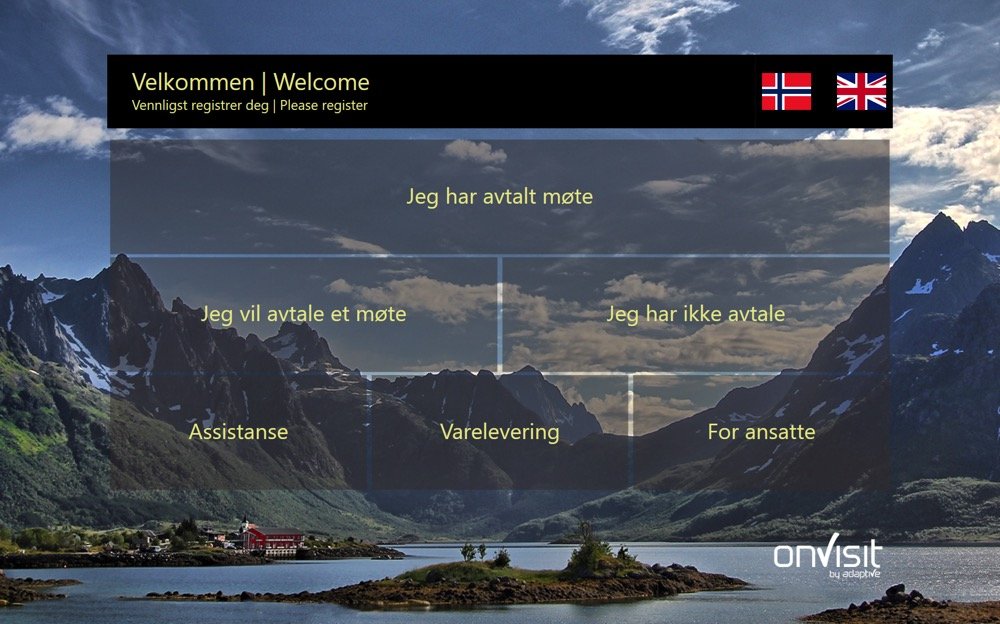
A visitor solution for municipal service centers combines online appointment booking with self-service visitor registration upon arrival. The resident selects the service area and time on the municipality's website, the appointment is automatically added to the caseworker's Outlook calendar, and the resident receives confirmation with a QR code. Upon arrival, the code is scanned on the onVisit screen, and the caseworker is notified by SMS, email or in Teams - without a staffed reception. Residents without an appointment are guided via buttons on the screen to the correct department.
Appointment booking
Microsoft Bookings and Outlook
Service areas, opening hours, duration and case managers are defined in Microsoft Bookings. Available times are retrieved from the case managers' Outlook calendars – individually or as a group.
ownership
The municipality controls the layout itself
Buttons, services, texts, colors and logos are managed by the municipality in the onVisit portal, in line with the municipality's graphic profile.
Supplier
Adaptive AS – part of Visma
onVisit has been developed in Norway since 2009 and is operated in Microsoft Azure within the EU, with an ISO/IEC 27001-based management system and Norwegian support.
References
Used by municipalities and county councils across the country
onVisit is in daily use at service squares, town halls and public reception areas in the public sector.
- Oslo Municipality
- Lillestrøm Municipality
- Arendal Municipality
- Nærøysund Municipality
- Troms County Municipality
A selection of public organizations that use onVisit. Contact us for a reference conversation.
One solution – multiple journeys
Four types of visitors, one visitor system
The Service Square doesn't just meet residents with appointments. onVisit gives each group their own, easy way in – without the municipality needing additional systems.
Resident with an agreement
Booked time online
The appointment is already in the case manager's calendar. Digital meetings can be held in Teams.
- Select service and time on the municipality's website
- Receive confirmation with QR code via email/SMS
- Scan the QR code upon arrival
- The caseworker is notified and picks up the resident.
Resident without an agreement
Drop-in at the service square
The buttons reflect the municipality's service areas and are changed by the municipality itself.
- Selects service area on screen
- Registers name and mobile number
- The department is notified via SMS, email or Teams
- Can book available time on site if desired
Other visitors
Meetings, suppliers and delivery of goods
The same screen covers the town hall's other guests, craftsmen and delivery men.
- Invite from Outlook with QR code – or select button on screen
- Delivery and assistance have their own choices
- The host is automatically notified
Without registration screen
Locations without reception
Suitable for smaller units, libraries, health centers and temporary locations.
- Scan the QR poster with your own mobile phone
- Registers in the browser – no app
- The host is notified and the resident is on the evacuation list.
The process
How visitor registration works on the service market
From booking to arrival in five steps – without staffing at the reception.
1
Resident booking
Selects service area and time on the municipality's website. The appointment is placed in the case manager's Outlook.
2
Confirmation
Email or SMS with time, address, practical information and personal QR code.
3
Check in
The resident scans the QR code on the onVisit screen – or registers as a drop-in.
4
Whistleblowing
The case manager or department is immediately notified via SMS, email or in a Teams channel.
5
Overview
The visit is logged. Employees see the visit overview, history and evacuation list in the browser.
This is what it looks like
Booking, registration and overview
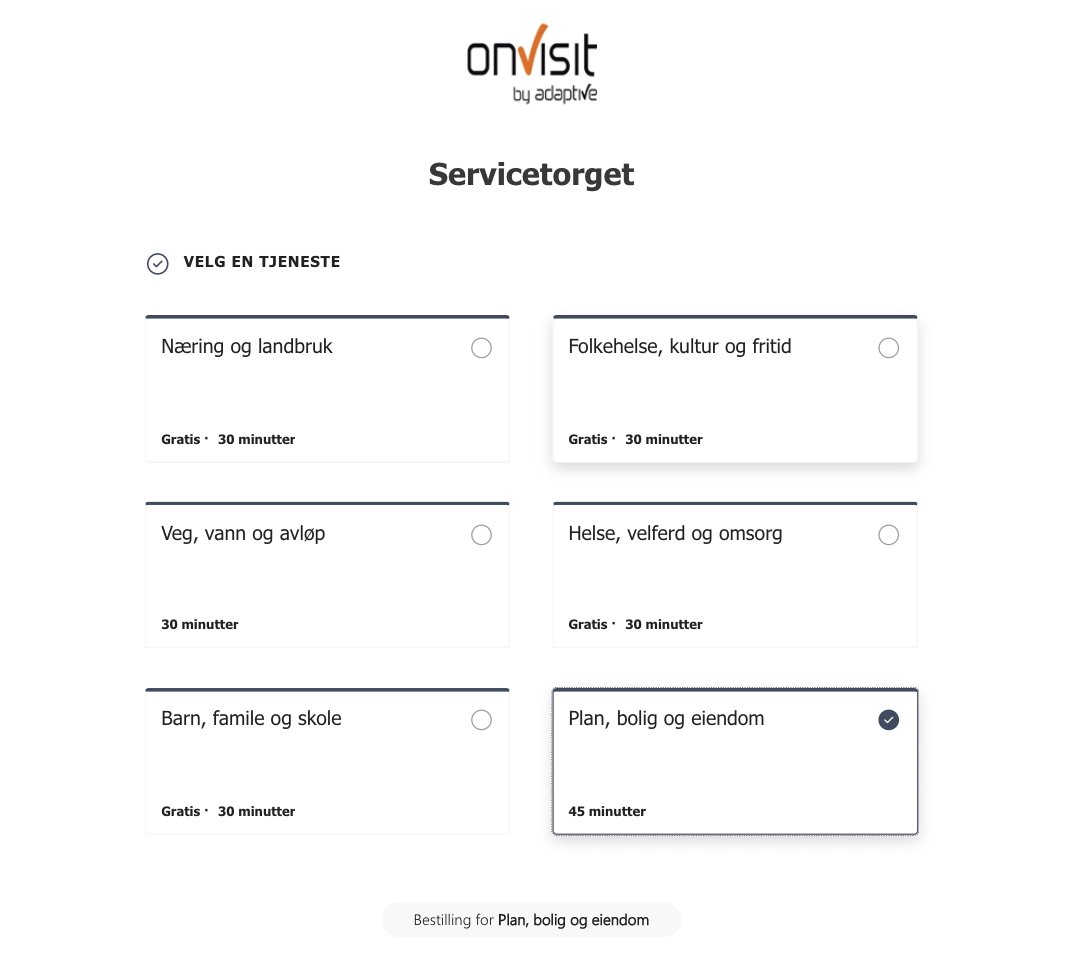
Online appointment booking
The resident chooses the service area and time. Services, duration, and opening hours are managed in Microsoft Bookings.
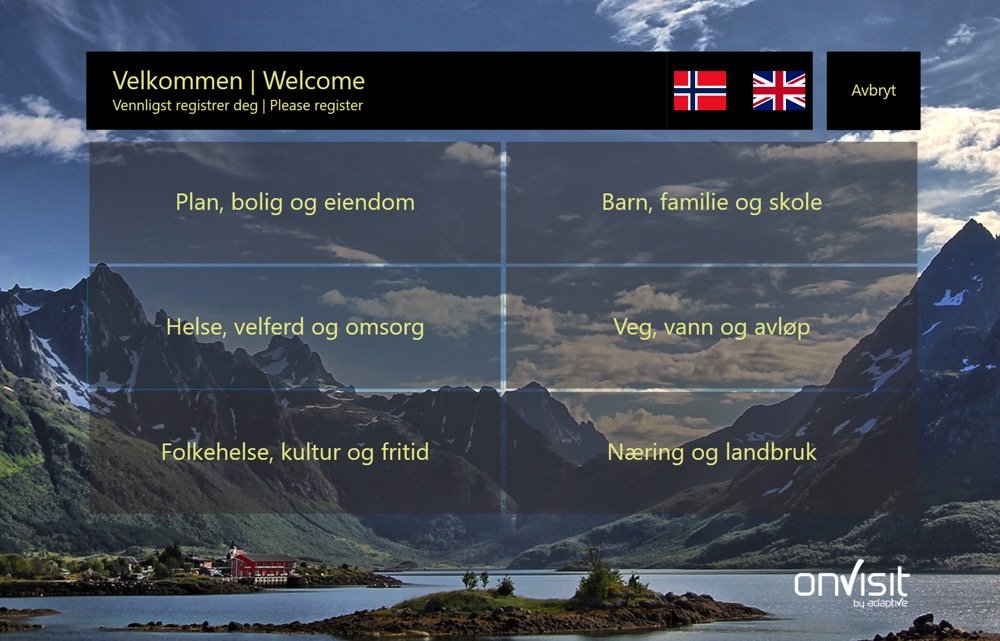
Registration screen with the municipality's profile
Buttons for service areas, delivery and assistance. Colors, background and logo follow the municipality's graphic profile.
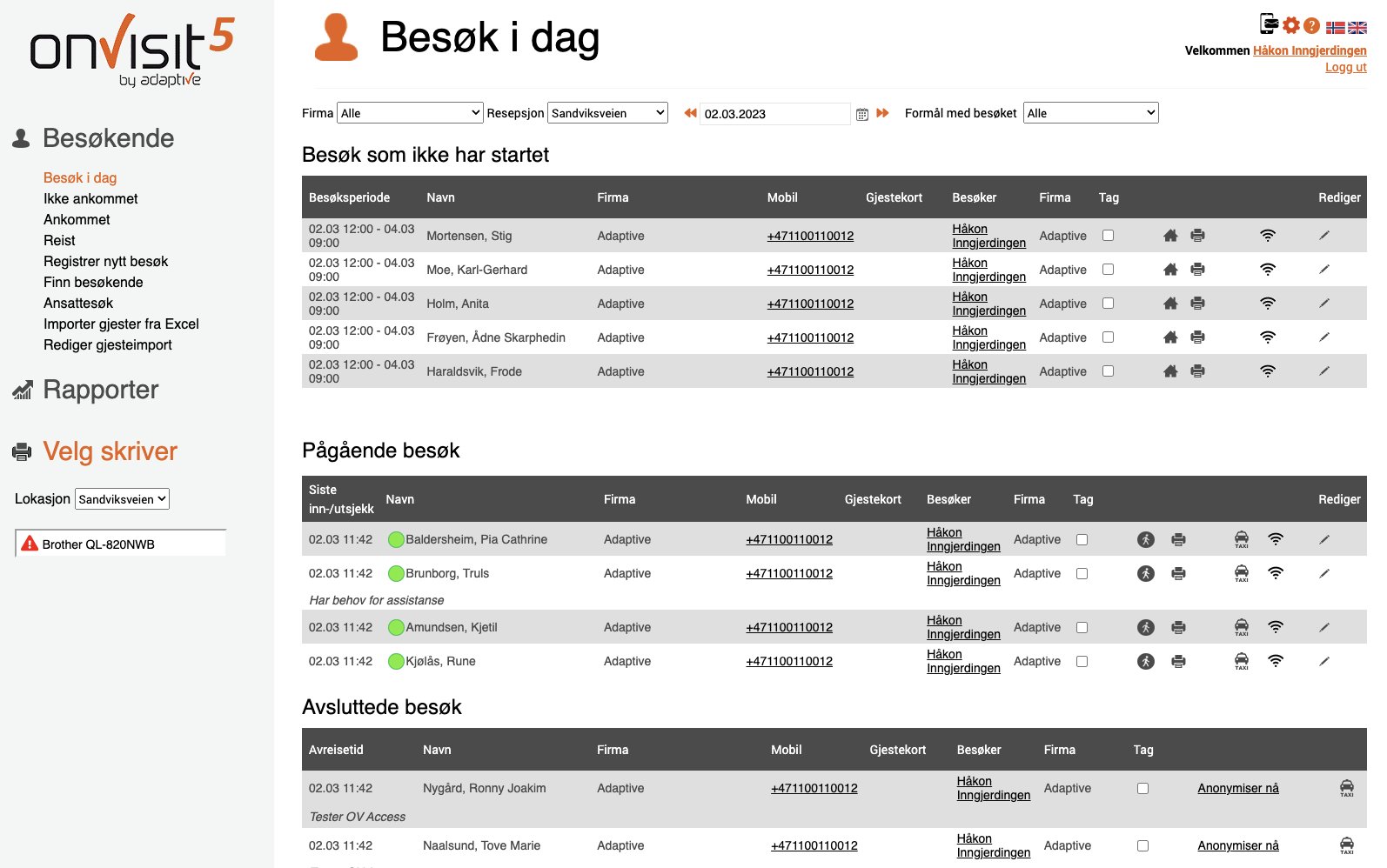
Employee visit overview
Always updated overview, reports with history and evacuation list – available in a browser for those who need it.
Advice from us
Three things the municipality should require from a visitor system
Experiences from municipalities and public entities that have changed or acquired visitor solutions.
1 · Flexibility
The municipality has full control
With onVisit, the municipality itself adds, changes or removes buttons and services directly in the web administration – booking, delivery of goods, kindergarten application or other citizen services – without being dependent on the supplier.
Adaptive is happy to assist with workshops and recommendations based on best practices.
2 · Total economy
Buy instead of lease
A visitor kiosk typically costs NOK 15,000–35,000 to purchase, depending on the model and equipment. We normally recommend owning the equipment rather than leasing it over 3–5 years: better cost control, no financing costs, and the municipality owns the equipment itself.
3 · Predictability
Uptime with commitments
What happens if the visitor registration fails after one year of operation? onVisit is delivered with an agreed uptime of 99% and financial compensation for qualifying downtime, according to the agreement. Historical availability over the past year is 99,99%*.
*Stated historical availability – not a guarantee of future uptime. Agreed uptime and compensation are regulated in the agreement.
Implementation, support and training
Easy to get started – and safe to operate
One responsible supplier from demo to operation.
1
Demo and needs review
We will review the service center's services, premises and visitor flow with you.
2
Choose equipment package
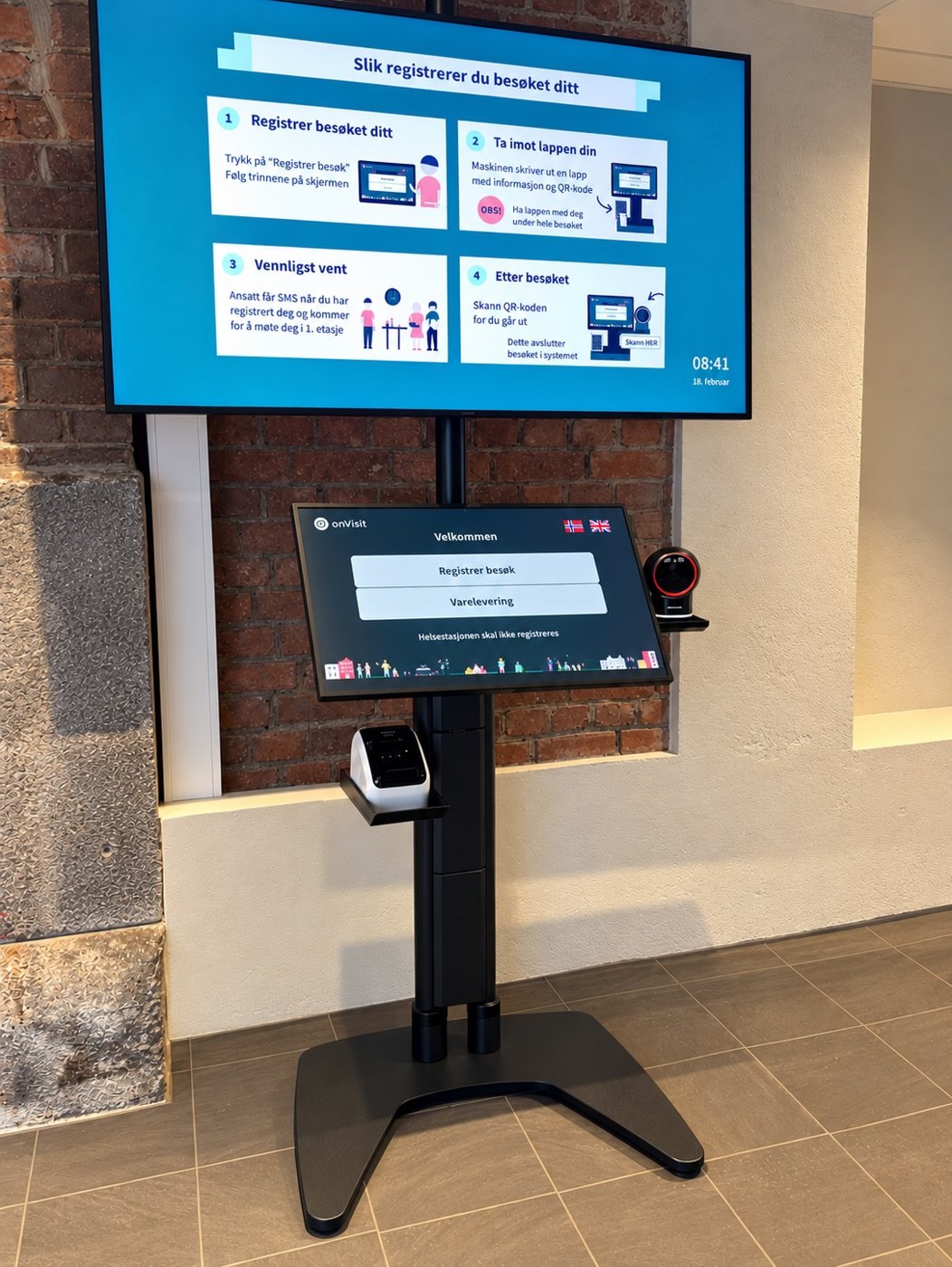
Floor stand, table console or wall mount – universally designed and adapted to the room.
3
Ready-made equipment
Monitor, scanner and printer are configured and tested before delivery.
4
Connect to power and internet
Plug & play: no local server, no software installation.
5
Training and start-up
Training of service desks and case managers. Dedicated project manager follows up on implementation.
Support
Norwegian, local support
Customer support and guidance from Adaptive in Sandvika, in Norwegian and during Norwegian working hours. Knowledge base with user guides at support.adaptive.no.
Drift
Operated by Visma
ISO/IEC 27001-based management system, operation in Microsoft Azure within the EU and 24/7 monitoring from Visma Security Center.
opplæring
Workshops and best practices
We help the municipality with the setup of service areas, buttons and routines – and with further development as needs change.
The winnings
What the municipality and its residents achieve
Efficiency
Case managers and residents avoid manual registration and coordination.
Lower operating costs
Automated registration and notification reduces the need for permanent staffing in the reception center.
Availability
Residents book when it suits them – around the clock, from their mobile or PC.
Universal Design
Screens in floor stands or table consoles with universal design, and registration via your own mobile phone for those who prefer it.
Privacy and GDPR
Data minimization, defined deletion deadlines and storage in the EU. Visitor data is handled in line with GDPR.
Emergency preparedness and HSE
Always updated evacuation list and SMS notification to employees and guests.

Equipment adapted to the service market
Premium floor stand with all-in-one display, universally designed. Alternatively table console or wall mount. Printer for visitor ticket and QR scanner as needed.
Additional services as needed
Timetables, taxi booking, guest network, group notification via SMS, contractor module and QR poster for registration without equipment.
Frequently Asked Questions
Frequently asked questions about visitor solutions for municipalities
How much does a visitor solution for the service center cost?
A visitor kiosk typically costs NOK 15,000–35,000 to purchase, depending on the model and equipment. In addition, there is a monthly license for onVisit. We recommend purchasing the equipment rather than leasing it over 3–5 years.
How do residents book an appointment?
The resident selects the service area and time on the municipality's website. The services are defined in Microsoft Bookings, and available times are retrieved from the caseworkers' Outlook calendars. Confirmation with a QR code is sent by email or SMS.
What happens to residents who come without an appointment?
They select their service area on the onVisit screen and register with their name and mobile number. The correct department is notified via SMS, email or in Teams, and the resident is notified when someone is available.
Can the municipality change buttons and services itself?
Yes. The municipality adds, changes and removes buttons and services directly in the onVisit portal, without contacting the supplier. Adaptive assists with workshops and recommendations as needed.
What uptime can the municipality expect?
onVisit is delivered with an agreed uptime of 99% and financial compensation for qualifying downtime, according to the agreement. Historical availability over the past year is 99,99%.
How is privacy and GDPR ensured?
onVisit only stores necessary information, automatically deletes after the municipality's defined deadlines and stores data in Microsoft Azure within the EU. Data processing agreement included.
Which municipalities use onVisit?
onVisit is used by Oslo Municipality, Lillestrøm Municipality, Arendal Municipality, Nærøysund Municipality and Troms County Municipality, in addition to over 3,000 private businesses.
How long does it take to get started?
The equipment is delivered fully configured and connected to power and internet. After a demo, equipment selection and training, the service center is normally operational within a few weeks.
Would you like to see how it works for your service center?
Book a demo and we will go through service areas, equipment and startup with you.
also read