
HSE for visitors · Instructions, declaration and evacuation
HSE for visitors – documented at each check-in.
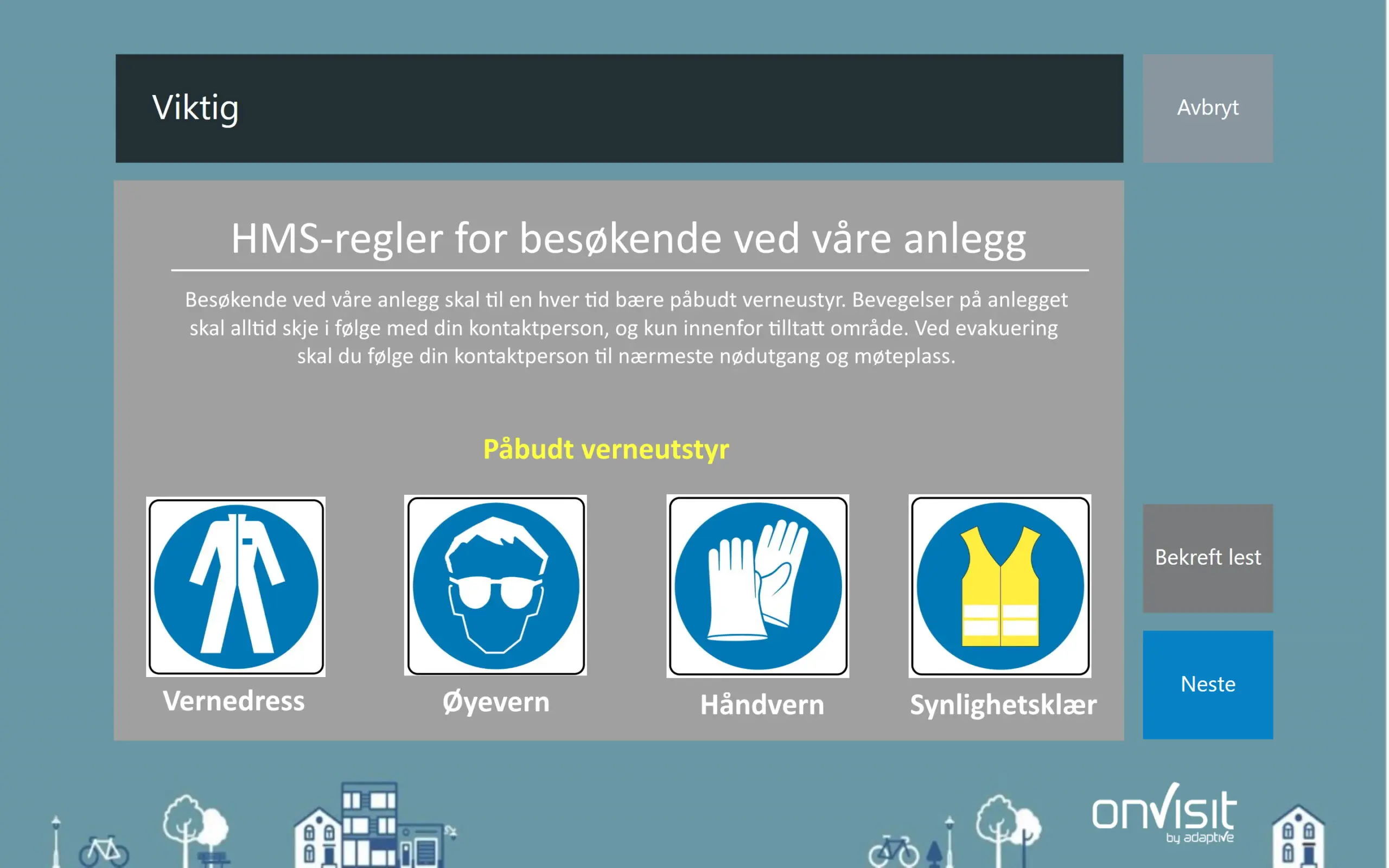
With onVisit, each visitor receives the correct HSE instructions before or upon arrival, confirms that it has been read, and is automatically placed on the evacuation list. Different rules for guests, tradesmen and contractors – and can be combined with ID check via BankID.
100%
of visitors receive instructions when it is part of check-in
10 languages
for HSE and NDA declaration
Real time
evacuation list on mobile
3 000+
businesses use onVisit
Briefly explained
What is HSE management for visitors?
HSE management for visitors means that the business informs guests, tradesmen and hired personnel about the applicable safety rules before they are allowed to enter the premises, documents that the information has been received, and knows who is in the building at all times. The Working Environment Act, Section 3-1, and the Internal Control Regulations require systematic HSE work and documented evacuation routines – this also applies to those who are just visiting. In onVisit, the HSE instructions are entered as a step in the visitor registration: the visitor reads, ticks and confirms, and the confirmation is saved on the visit.
Instructions
The right regulations for the right type of visit
Different texts per visitor type, location and company: short rules for meeting guests, complete safety instructions for tradesmen and contractors.
Documentation
Confirmation saved on the visit
The time of the last approved declaration is displayed on the visitor. Also applies to NDA and confidentiality agreements.
preparedness
Real-time evacuation list
All checked-in guests are on the evacuation list, available on the fire department's mobile phone. SMS notification to guests and employees in the event of incidents.
The challenge
From HSE poster to documented confirmation
Information that is not read is not communicated. onVisit makes HSE part of the flow – not an extra sheet.
This is often done today
- HSE poster at reception that few people read
- Paper forms that are filed in a binder – or not
- No difference between a meeting guest and a craftsman
- Evacuation list based on a guestbook
With onVisit
- The instruction is a mandatory step in check-in.
- Visitor confirms – confirmation is stored digitally
- Separate rules per visitor type, location and language
- Updated evacuation list on mobile, always
The process
How HSE instructions work in visitor registration
Five steps from arrival to documented confirmation.
1
Select visit type
Guest, craftsman or contractor – the button on the screen determines which instruction is displayed.
2
Read the instructions
HSE rules, NDA or self-declaration are displayed in the visitor's language, as text or form.
3
Confirm
The visitor checks off each item and approves. Without approval, check-in is not completed.
4
Documents
The confirmation is saved on the visit. If necessary, it is combined with an ID check via BankID and approval by the host before entry.
5
Evacuate safely
All checked-in guests are on the evacuation list until they check out. SMS notification in case of incidents.
Multiple channels
Four ways to communicate HSE information
How the information is best conveyed depends on the scope and how the visit is conducted. onVisit supports all four – and they can be combined.
1 Upon arrival
On the registration screen
Short regulations are displayed directly at check-in. The visitor reads, ticks and approves before completing the registration. Different texts for different visitor types.
- Selecting visit type
- Reading instructions
- Checks and approves
- Check-in complete
2 · With form
Questions and answers from the visitor
If you need answers from the visitor – allergies, protective equipment, courses – a form from SurveyXact or Google Forms can be displayed directly on the screen and linked to check-in.
- Form opens in check-in
- Visitors respond
- Receipt sent to onVisit
- Check-in complete
3 · On your own mobile
SMS link after check-in
If the regulations are extensive or a video, the visitor automatically receives an SMS with a link after checking in. This frees up the screen for the next guest.
- Checking in
- Receive SMS with link
- Reading or watching video on mobile
Feel free to combine it with an info screen at the reception that shows HSE information or video on loop.
4 · Before arrival
In the invitation
With onVisit Invite, the HSE information is sent along with the meeting time, address and QR code when the host invites from Outlook. Visitors come prepared.
- Host invites from Outlook
- Visitors receive emails with HSE info and QR
- Scan QR upon arrival

HSE information right on your mobile
Example of a message the visitor receives after check-in or with the invitation. You edit the text yourself in the onVisit portal.
Contractors and subcontractors
Own flow for craftsmen and contractors
The contractor module registers hired personnel and tradesmen with their own requirements: complete safety instructions, documentation and an overview of who is on the premises - separate from regular guests.
Visits over longer periods are handled with repeated check-ins and check-outs, so that the evacuation list is always correct.
Identity
Combine the declaration with ID check via BankID
For sensitive areas, the HSE declaration can be combined with digital identification: the visitor scans their ID card in the BankID app upon check-in, and their name is verified before the declaration is approved. Then you not only know that the instruction has been confirmed – but also by whom.
Visitors without BankID must show identification manually. BankID identification currently applies to Norwegian users.
Approval
Access only after host approval
With the authorization module, the visit is set to “awaiting approval” after check-in. The host or receptionist approves or denies – individually or for an entire group – before the visitor is allowed to proceed. Can be turned on for drop-ins, pre-registered guests, or both.
Legal requirements
What do the regulations require of you?
Working Environment Act Section 3-1
Systematic HSE work
The employer must ensure systematic health, environmental and safety work. In practice: documented routines for information and evacuation – also for visitors.
Internal control regulations
Documented routines
Requirements for documentation of responsibility, risk assessment and follow-up. A digital log of who has received and confirmed HSE instructions is such documentation.
Fire protection and evacuation
Know who is in the building
In the event of a fire or incident, the fire chief must be able to make a call. onVisit provides an updated evacuation list on mobile and SMS notification to all checked-in guests.
The features support compliance, but meeting the requirements must be assessed against the organization's own risk, routines, and regulations.
The winnings
What you achieve
Everyone gets the instructions.
When HSE is a step in check-in, no one gets past the poster.
Documentary
Confirmation with time is stored on the visit and can be retrieved during an inspection or incident.
Correct level
Short rules for meeting guests, full instructions for craftsmen – without manual sorting.
Multilingual
Statements in Norwegian, English, Swedish, Danish, German, Polish, Spanish, French, Russian and Nynorsk.
Less work at the reception
No paper form, no binder. Links and forms are sent automatically.
Privacy protected
Data minimization and automatic deletion after your deadlines. If you use Google Forms, Google is the data processor for the form data.
Frequently Asked Questions
Frequently asked questions about HSE for visitors
What is a HSE statement for visitors?
An HSE declaration is a short safety instruction that the visitor reads and confirms before entering – for example, requirements for protective equipment, traffic rules and escape routes. In onVisit, it is displayed as a step in check-in, and the confirmation is saved on the visit.
Can we have different HSE rules for guests and craftsmen?
Yes. Declarations are set up per visitor type, per location and per company. A meeting guest may receive three short points, while a craftsman may receive full safety instructions and possibly a form.
Can the visitor answer questions, not just confirm?
Yes. onVisit supports forms from SurveyXact and Google Forms directly in check-in. The questions can be required, and the receipt is sent back to onVisit so that check-in is only completed when the form is submitted.
What if the HSE instruction is a video or a long document?
The visitor is then sent an SMS with a link after check-in, so that it can be read or viewed on their own mobile. Alternatively, the video is shown in a loop on an info screen at the reception, or the information is sent in the invitation with onVisit Invite.
What languages are supported?
HSE and NDA statements can be drawn up in Norwegian Bokmål, Nynorsk, English, Swedish, Danish, German, Polish, Spanish, French and Russian. The visitor chooses the language at check-in.
How does the evacuation list work?
Everyone who is checked in and not checked out is on the list. The fire chief and guard retrieve it on their mobile phone at the meeting point, and can send an SMS notification to everyone who has checked in.
Can the HSE declaration be combined with ID control?
Yes. When checking in, the visitor can digitally authenticate themselves with BankID (the ID card in the BankID app) before the declaration is approved, so that the confirmation is linked to verified identity. Visitors without BankID show identification manually. In addition, the authorization module can require the host to approve the visit before entry.
Is this enough to comply with the Working Environment Act?
onVisit provides documentation and procedures that support the requirements of the Working Environment Act Section 3-1 and the Internal Control Regulations. Whether the requirements are met depends on the organization's own risk assessment and other procedures.
How should HSE be addressed in your reception?
Contact one of our experts and we will find a combination of screen, form, SMS and invitation that suits your visitor types.
also read
More about safe visitor management
Legal requirements